Wednesday, February 24, 2016
IMAP Mail Client Setting
POP3 Mail Client Setting
1. Open Outlook, select tab File > Add Account 2. Select POP or IMAP and click on Next 3. Check the option Manual setup or additional ser...
Tuesday, October 20, 2015
Setting up Gmail for POP3 and SMTP
Note! If you previously had a forwarder to your Gmail, you will need to remove that after your Gmail is set up.
Also! We recommend using the SSL settings. The SSL email setup is more secure as it encrypts the data while in transit.
Steps 1
Log into your Gmail account.
Steps 2
Settings POP3 SMTP Gmail Go to the Gear at the top right and select Settings.
Steps 3
Click the Accounts tab.
Next to "Check mail from other accounts (using POP3)," click Add a POP3 mail account you own.
Steps 5
Enter your domain's email address and click Next Step.
Enter your POP3 information for your domains email address in the form.Click Add Account.
Steps 7
You will see a message stating Your mail account has been added. You can set the email to send as well.
Note! If you do not want to send through Gmail, click the No radio button. You don't need to follow the next steps.
If you want to send through Gmail, select Yes and Click Next Step.
Steps 8
Enter your Name.Click Next Step.
Steps 9
On the Send mail through your SMTP server page, fill in your SMTP Server, Username (full email address), and Email Password. Then, click Add Account.
Steps 10
Now, Gmail will email a verification code to the address you just added. Check your domains email for a message Gmail sent you. Click the link in the email, or Enter the code into the text box and click Verify.
Now you will see your Domains email address in the Send Email As and the Check mail from other accounts section.
You can use your Gmail account to send and receive your domain email address by setting up your domains email address as a POP3 and SMTP acc...
Friday, June 12, 2015
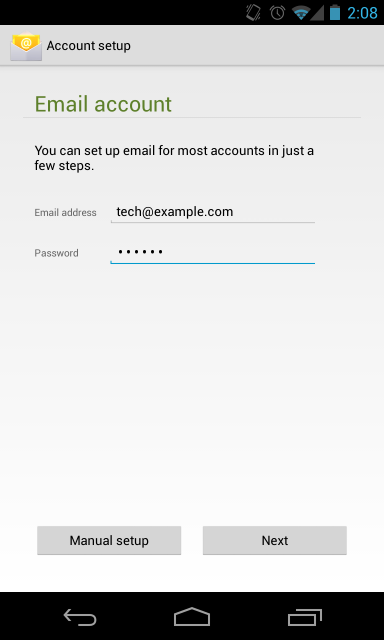
How to setup email on Android
1. Open your email client.
2. Enter your full email address and password.
3. For the Account type, select POP3.
4. For the Incoming settings, we recommend using your access domain for the incoming server. You will also want to leave the Security Type as None. See Figure 3 as an example.
5. For the Outgoing settings, we also recommend using your access domain for the SMTP server.
6. Configure your Account options as desired on the subsequent screens and you're done!
1. Open your email client. 2. Enter your full email address and password. 3. For the Account type, select POP3. 4. For the Incoming settings...
How to setup email on iPhone
1. In your iPhone, go to Settings-> Mail, Contacts, Calendars and go to Add Account. From the selection shown, choose "Other".

2. Enter the required information as you see on your screen and confirm by pressing "Save".
3. Click on "POP". If you have correctly entered your information in the previous screen, all the fields here should already be filled in for you.
Fill in the required fields as you see on the picture below but with your account information. Then click on "Save" to confirm.
4. After a few seconds, if the following screen will pop up. Click on "Yes".
Enjoy using Webmail in your iPhone!
1. In your iPhone, go to Settings-> Mail, Contacts, Calendars and go to Add Account. From the selection shown, choose "Other"...
Sunday, May 24, 2015
Paypal Fees (Updated on 25th, May 2015)
Simple Fees:
Selling is 4.4% + 2.00 MYR per sale, or lower.
Merchant Fees:
More about merchant fees:
Simple Fees: When you buy from an overseas seller, there’s a fee for currency conversion. When you sell, there are no monthly or cancellatio...
Wednesday, April 1, 2015
Operion Founder Jim T. announces establishment of business relations with Bernama
With the collaborations, both party is able to offer a synergized business experience in favor of the SMEs. Participating in a trade show can be a great way for enterprises to advertise to a target market and create brand awareness. However, booking, travelling, displaying and demonstrating maybe quite a bit of competition at all shows."Poor promotion can mean the costs of attending the trade show outweigh any revenue you gain and choosing the wrong trade show can be very costly", according to Jim. Enterprenuers may not be aware that there are so many foreign prospects and potential buyers virtually searching for the right Malaysian products and services for their respective marketplace by using internet. And connecting to these potential buyers is crucial prior to participating in any trade shows.With the rapid change in communication and media landscape participating in trade shows is no longer an exposure but a critical opportunity to confidently seal the deal.
Operion will launch an awesome internet business and marketing program in the middle of the year to help the small and medium enterprises ride onto the internet trend. BERNAMA will provide globally reliable digital content for enterprises while Operion will make it simple for them to capture and response to prospects and buyers respectively.
Operion founder Jim T of Operion Ecommerce & Software Sdn Bhd a web marketing and e-commrece company announced a new business partnershi...