Friday, June 12, 2015

How to setup email on Android

How to setup email on Android


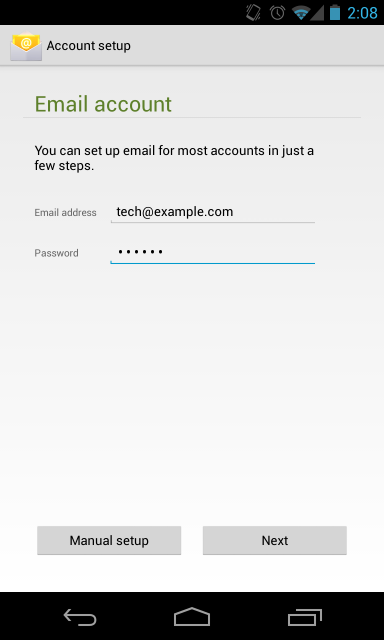
1. Open your email client.
2. Enter your full email address and password.


3. For the Account type, select POP3.


4. For the Incoming settings, we recommend using your access domain for the incoming server. You will also want to leave the Security Type as None. See Figure 3 as an example.


5. For the Outgoing settings, we also recommend using your access domain for the SMTP server.


6. Configure your Account options as desired on the subsequent screens and you're done!

How to setup email on iPhone

How to setup email on iPhone


1. In your iPhone, go to Settings-> Mail, Contacts, Calendars and go to Add Account. From the selection shown, choose "Other".


2. Enter the required information as you see on your screen and confirm by pressing "Save".


3. Click on "POP". If you have correctly entered your information in the previous screen, all the fields here should already be filled in for you.
Fill in the required fields as you see on the picture below but with your account information. Then click on "Save" to confirm.


4. After a few seconds, if the following screen will pop up. Click on "Yes".


Enjoy using Webmail in your iPhone!

Sunday, May 24, 2015

Paypal Fees (Updated on 25th, May 2015)

Paypal Fees (Updated on 25th, May 2015)

Simple Fees:

When you buy from an overseas seller, there’s a fee for currency conversion. When you sell, there are no monthly or cancellation fees. You only pay a fee after each sale. 

Selling is 4.4% + 2.00 MYR per sale, or lower.

Merchant Fees:

The more you sell, the less you pay. There are no hidden fees. You can accept all major card payments from over 143 million customers worldwide. You don't have to pay anything until you get paid for selling something. International payments cost a little more.

More about merchant fees:

Wednesday, April 1, 2015

Operion Founder Jim T. announces establishment of business relations with Bernama

Operion Founder Jim T. announces establishment of business relations with Bernama


Operion founder Jim T of Operion Ecommerce & Software Sdn Bhd a web marketing and e-commrece company announced a new business partnership with BERNAMA in March this year.

With the collaborations, both party is able to offer a synergized business experience in favor of the SMEs. Participating in a trade show can be a great way for enterprises to advertise to a target market and create brand awareness. However, booking, travelling, displaying and demonstrating maybe quite a bit of competition at all shows."Poor promotion can mean the costs of attending the trade show outweigh any revenue you gain and choosing the wrong trade show can be very costly", according to Jim. Enterprenuers may not be aware that there are so many foreign prospects and potential buyers virtually searching for the right Malaysian products and services for their respective marketplace by using internet. And connecting to these potential buyers is crucial prior to participating in any trade shows.With the rapid change in communication and media landscape participating in trade shows is no longer an exposure but a critical opportunity to confidently seal the deal.

Operion will launch an awesome internet business and marketing program in the middle of the year to help the small and medium enterprises ride onto the internet trend. BERNAMA will provide globally reliable digital content for enterprises while Operion will make it simple for them to capture and response to prospects and buyers respectively.

Monday, March 23, 2015

GST Information for iPay88 Payment Gateway

GST Information for iPay88 Payment Gateway

GST ON IPAY88 SERVICES


According to Goods and Service Tax Act 2014, business with an annual turnover exceeding RM500,000 is recommended by Royal Malaysia Custom (RMC) to obtain its GST registration number by 31 December 2014.
With that, please find below our GST registration numbers for your record:-

Company Name Company Registration GST Number
Mobile88.com Sdn Bhd 521817-M 000576036864
iPay88 Sdn Bhd 726820-X 001311219712

We urge all registered merchants to update your company details with GST registration number at http://goo.gl/forms/rXn4nQAnlE by 15 March 2015 as part of our system upgrade to issue you valid Tax Invoice in the GST era.
We also enclose below illustrations that help you to compare and understand better the impact of GST on iPay88 fees:-

Current Without GST

  • Transaction value = RM100
  • iPay88 fees = RM100 X 3% (assume at 3% of transaction value) = RM3.00
  • iPay88 pays back to merchant = RM100 - RM3 = RM97
  • Merchant's profit = RM100 - RM3 = RM97

In GST era if you are non GST registrant & not charging 6% GST on your sales

  • Transaction value = RM100
  • iPay88 fees = RM100 X 3% (assume at 3% of transaction value) = RM3.00
  • GST on iPay88 fees = RM3 X 6% = RM0.18
  • iPay88 pays back to merchant = RM100 - RM3 - RM0.18 = RM96.82
  • Merchant's profit = RM100 - RM3 - RM0.18 (GST not recoverable) = RM96.82

In GST era if you are GST registrant & charge 6% GST on top of your sales

  • Transaction value = RM100 + 6% GST RM6 = RM106 (total receipt included RM6 GST from customer)
  • iPay88 fees = RM106 X 3% (assume at 3% of transaction value) = RM3.18
  • GST on iPay88 fees = RM3.18 X 6% = RM0.19
  • iPay88 pays back to merchant = RM106 - RM3.18 - RM0.19 = RM102.63
  • Merchant - GST payable to Custom = RM6 - RM0.19 (input tax claimable) = RM5.81
  • Merchant profit = RM100 - RM3.18 = RM96.82

In GST era if you are GST registrant & absorb 6% GST in your sales

  • Transaction value = RM94.34 + 6% GST RM5.66 = RM100 (total receipt included RM5.66 GST from customer)
  • iPay88 fees = RM100 X 3% (assume at 3% of transaction value) = RM3
  • GST on iPay88 fees = RM3 X 6% = RM0.18
  • iPay88 pays back to merchant = RM100 - RM3 - RM0.18 = RM96.82
  • Merchant - GST payable to Custom = RM5.66 - RM0.18 (input tax claimable) = RM5.48
  • Merchant profit = RM94.34 - RM3 = RM91.34
Further, you are advised to check the below link on GST guide issued by Custom on e-commerce.
http://gst.customs.gov.my/en/rg/SiteAssets/industry_guides_pdf/Guide%20on%20E-commerce%2020.08.2014.pdf

Kindly send email to gst@ipay88.com.my if clarification is required on
iPay88 fees related to GST.
Thank you.

Sincerely,
iPay88 Sdn Bhd
http://www.ipay88.com

Thursday, March 19, 2015

.my DOMAIN REGISTRY Rules and Regulations

.my DOMAIN REGISTRY Rules and Regulations


This document sets out .my DOMAIN REGISTRY’s rules and regulations regarding the supporting documents that need to be submitted together with an application to register a .my domain name.
Copies of supporting documents may be required to be submitted for applications for:
The Registrant's name must be the organisation’s / institution’s / individual’s name as EXACTLY stated in the relevant supporting documents.


NEW REGISTRATIONSFor new registrations submitted direct to .my DOMAIN REGISTRY or the Resellers, you may be required to furnish relevant supporting documents to .my DOMAIN REGISTRY or the Resellers, as applicable.

Where you are required to submit relevant supporting documents to .my DOMAIN REGISTRY or the Resellers, your domain name will be registered after the application and the relevant supporting documents have been received and verified.
For new .com.my, .net.my, .org.my and .my domain name registrations via Resellers, please take note that organisations formed pursuant to the:

• Business Registration Act 1956,
• Companies Act 1965, and
• Legal Profession Act 1976
need not submit their supporting documents to Resellers unless specifically requested.
Please see listing below as to the type of supporting documents you may be required to submit to Resellers.
For the avoidance of doubt, all other types of applicants MUST submit the appropriate supporting documents detailed below and such other documents as may be requested by the Resellers.
Where required to submit supporting documents, you shall have 14 days to furnish .my DOMAIN REGISTRY or the Reseller, as applicable, with your supporting documents, failing which your application to register a domain name will be cancelled. However, if your application to register a domain name has been cancelled, it may be resubmitted subject to the domain name being still available.
Please note you are required to warrant that all information submitted in your application to register a domain name is complete, correct and accurate.

.my DOMAIN REGISTRY reserves the right to suspend, delete and/or transfer the domain names of Registrants who have been found to have supplied incomplete, incorrect or inaccurate information in their applications to register a domain name.

.my DOMAIN REGISTRY reserves the right to carry out random checks on the veracity of the information submitted by Registrants from time to time.

You may apply to register for the following second-level and third level domain names:
• .my
- For all Malaysian and resident foreign individuals and entities.
• .com.my
- For commercial organisations/activities.
• .net.my
- For network-related organisations/activities.
• .org.my
- For organisations/activities which do not qualify for other categories.
- For all Malaysian citizens and non-Malaysians residing in Malaysia.
• .edu.my
- For Malaysian educational organisations only.
• .gov.my
- For Malaysian government organisations only.
• .mil.my
- For Malaysian military organisations only.
For details on how to register a new domain name, please refer to Registering .my Domain Names.
Registering .com.my, .net.my and .org.my
It is the Registrant's responsibility to select the most appropriate second level domain name (.my) and/or third level domain name (com.my, net.my, org.my, name.my). Please refer to the document on Choosing a Domain Name.

TRANSFERRING A REGISTERED DOMAIN NAME

If you wish to transfer your domain name to another organisation, please submit a Transfer Application.
An application to transfer a domain name will be subject to the same Supporting Document requirements as required for registering a new domain name.
MYNIC REGISTRY Supporting Documents

MYNIC REGISTRY Supporting Documents


Supporting Documents for organisations certified by the Malaysian ROC, ROB and ROS
ORGANISATION
SUPPORTING DOCUMENT(S)
Company pursuant to Companies Act 1965 (Akta Syarikat 1965)Certification (Perakuan Pendaftaran) by Registrar of Companies (Pendaftar Syarikat) i.e.
  • Borang 8 (Perakuan Perbadanan Syarikat Awam)
  • Borang 9 (Perakuan Pemerbadanan Syarikat Sendirian)
  • Borang 13 (Perakuan Pemerbadanan Atas Pertukaran Nama Syarikat)
  • Borang 19 (Perakuan Pemerbadanan Atas Pertukaran Menjadi Syarikat Persendirian)
  • Borang 83 (Certificate of Registration of A Foreign Company)
  • Borang 83A (Certificate of Registration of Change of Name of A Foreign Company)
Business pursuant to Business Registration Act 1956 (Akta Pendaftaran Perniagaan 1956)


For Sabah and Sarawak:

Business pursuant to Commercial License Ordinance 1948 (Ordinan Perlesenan Perdagangan 1948)
Certification (Perakuan Pendaftaran) by Registrar of Business (Pendaftar Perniagaan) i.e.
  • Borang D


Certification (Perakuan Pendaftaran) from Registrar of Commercial License Ordinance i.e.
  • Borang B
Society pursuant to Societies Act 1966 (Akta Pertubuhan 1966)Certification (Perakuan Pendaftaran) by Registrar of Societies (Pendaftar Persatuan) i.e.
  • Borang 3 Peraturan 5 Peraturan 7(1) (Kebenaran Menukar Nama)
  • Peraturan 7(4) (Sijil Kebenaran untuk penubuhan cawangan)
Note: These Supporting Documents will be updated from time to time.


Supporting Documents for other types of organisations
ORGANISATION
SUPPORTING DOCUMENT(S)
Representative OfficeOfficial letter from Ministry of Industrial Trade and Industry (MITI) regarding representative Office Registration (Pendaftaran Pejabat Perwakilan)
Regional OfficeOfficial letter from Ministry of Industrial Trade and Industry (MITI) regarding Regional Office Registration (Pendaftaran Pejabat Serantau)
Foreign EmbassyOfficial request letter from the Foreign Embassy
Foreign OfficeOfficial letter from Ministry of Foreign Affairs regarding approval of setting up of foreign office
Architect FirmCertificate from Lembaga Arkitek Malaysia
Law FirmOfficial approval letter regarding setting up of firm from Bar Council (Majlis Peguam)
Audit Firm pursuant to Companies Act 1965 (Akta Syarikat 1965)
Sports Organisation pursuant to Sports Development Act 1997 (Akta Pembangunan Sukan 1997)Certification (Perakuan Pendaftaran) i.e. Perakuan Pendaftaran (Pendaftaran Badan Sukan 1998, Peraturan 6)
Valuer, Appraiser and Estate Agent Firm pursuant to Valuers, Appraisers and Estate Agents Act 1981 (Akta Penilai, Pentaksir dan Ejen Harta Tanah 1981)Certification (Perakuan Pendaftaran) i.e. Borang N (Kuasa Untuk Menjalankan Amalan Bagi Firma)
Trade Union pursuant to Trade Union Act 1959 (Akta Kesatuan Sekerja 1959)Certification (Perakuan Pendaftaran) i.e. Borang D (Perakuan Pendaftaran : Seksyen 13, Peraturan 7)
Lembaga (Board) set up pursuant to a statuteCopy of the relevant Statute/Act
Trustee pursuant to Trustees Incorporation Ordinance 1952 (Akta Pemegang Amanah (Perbadanan) 1952)Certification (Perakuan Pendaftaran) i.e.
  • Certificate of Incorporation
  • Certificate of Affiliation
Farmers Organisation pursuant to Farmers' Organization Act 1973 (Akta Pertubuhan Peladang 1973)Certification (Perakuan Pendaftaran)
Religious EntityFormation Documents (i.e ROS)

Official letter approving/accrediting/registering the relevant body from the relevant government Religion Department
Parents Teachers Association pursuant to Kaedah-kaedah Persatuan Ibubapa-Guru-guru, 1973Certification (Perakuan Pendaftaran) by Registrar of Schools (Pendaftar Sekolah-Sekolah)
Note: These Supporting Documents will be updated from time to time.


For .my individuals application, please click here.